Submodules - generic
What are Submodules?
In summary a “submodule” is just a nested repository. To pratically
understand what this means, a visual example is useful. Specifically, imagine we
have a repository with the title Project, which contains some
miscellaneous files along with two components; in a version of this repo that
doesn’t use submodules (hereafter refered to as a “Monorepo”), git will
be tracking it as
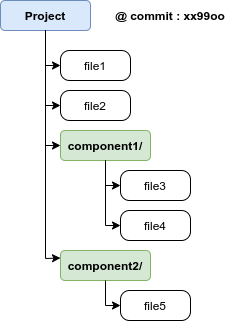
Monorepo Example
Specifically, this means that Project tracks all changes in
component1 and component2 - for example, if file3 is modified, when
>> git status
is ran anywhere within Project, we see
Changes not staged for commit:
  (use "git add <file>..." to update what will be committed)
  (use "git checkout -- <file>..." to discard changes in working directory)

            modified:   component1/file3
Now, provided the code for component1 and component2 remains relatively
simple, this is a perfectly valid way to track this project. However, when the
complexity of component1 and component2 baloons to a point where the
developers want to track the development of sub-components separately (e.g. for
an Atmosphere or Ocean model), this is where submodules come in! Using submodules
to track component1 and component2 just means that we now treat them as
their own repositories, and Project now only keeps track of the commit of
each of these components, i.e. git will be tracking it has 3 separate repositories:
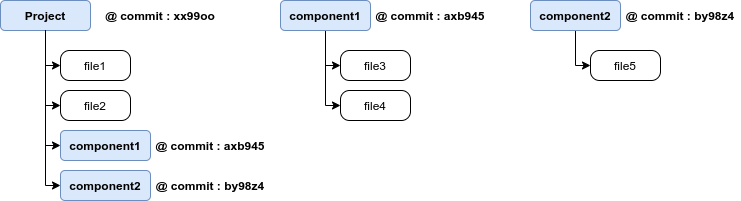
Super-repo Example
To see how this differs from the monorepo example, if we decide to modify
file3 again and run git status directly beneath Project, we see:
rcs001@hpcr4-in:~/TMP/Project
 >> git status
On branch main
Changes not staged for commit:
  (use "git add <file>..." to update what will be committed)
  (use "git checkout -- <file>..." to discard changes in working directory)
  (commit or discard the untracked or modified content in submodules)

                modified:   component1 (modified content)
and if we also add a new file (file6) to component1, the “modified” line becomes:
modified: component1 (modified content, untracked content)
The “Super-repo” Project only knows that there has been
modifications/additions in component1, but it doesn’t know (or care) about
the specifics - one needs to navigate into component1 to see the
specific changes.
It is worth noting that if the developer wishes to commit the
changes in component1 and have this new version be used on the main
branch of Project, they would first need to git add/commit the changes
within component1, and then navigate back up to Project and git add/commit
the new version of the sub-component. For the sake of being comprehensive,
it should be stated that when changes are commited in a submodule, git
status at the super-repo level will produce a “new commits” message, i.e:
modified: component1 (new commits)
and to commit the new version to the super-repo, the developer then needs to run
git add component1
like it is an individual file.